
A GIFT, BY YOUR CHOICE
If you enjoy what I do and feel like supporting me, you can send me a gift here.
We recommend using Trust Wallet to send your gift. Please follow the steps below carefully.
STEP 1 — Open Your Wallet
Open your Trust Wallet or MetaMask app.
STEP 2 — Select USDT
Choose Tether (USDT) or (USD) from your list of available tokens.
STEP 3 — Select the Ethereum Network
Make sure USDT is on the Ethereum (ERC20) network. Do not select BNB Smart Chain or any other network.
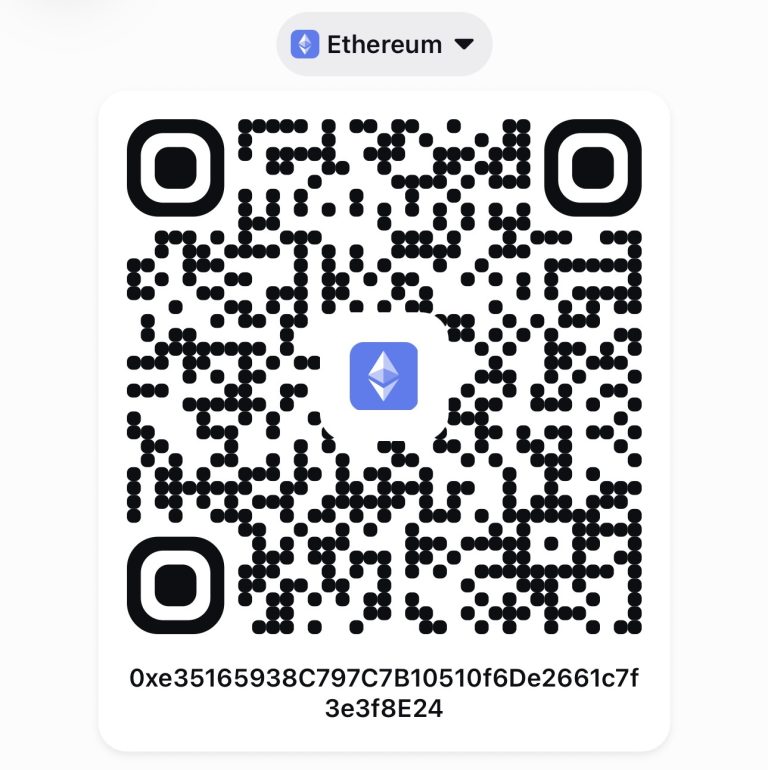
STEP 4 — Scan the QR Code or Enter the wallet Address
Tap Send in your wallet and scan the QR code displayed on this page, if your wallet supports QR scanning for recipient addresses. Alternatively, copy the recipient’s wallet address provided below.
STEP 5 — Enter Your Gift Amount
Enter the amount of USDT you would like to send.
STEP 6 — Check Your Transaction
Carefully verify the recipient’s wallet address, the USDT amount, and the Ethereum network before continuing.
STEP 7 — Confirm and Send
Make sure you have enough ETH in your wallet to cover the Ethereum network fee. Then confirm the transaction.
Only send USDT via the Ethereum (ERC-20) network.
Do not send USDT via BNB Smart Chain, Polygon, or any other network.
Always double-check the recipient address and network before confirming. Cryptocurrency transfers are generally irreversible.
Ethereum network fees are paid in ETH and are separate from the amount of USDT you send.
about NC's private club
Where luxury and the digital world are combined. this club motto is
“Unique Products for Unique people”
Newsletter
“Join the newsletter for updates!”